
Engineering smart wearables & audio since 2013 — 10+ years of consumer-tech experience
In-house QC · BIS & RoHS aligned components · Warranty-backed service network
New: AI smart glasses, 3D dome AMOLED smartwatches & 65W power banks
0%

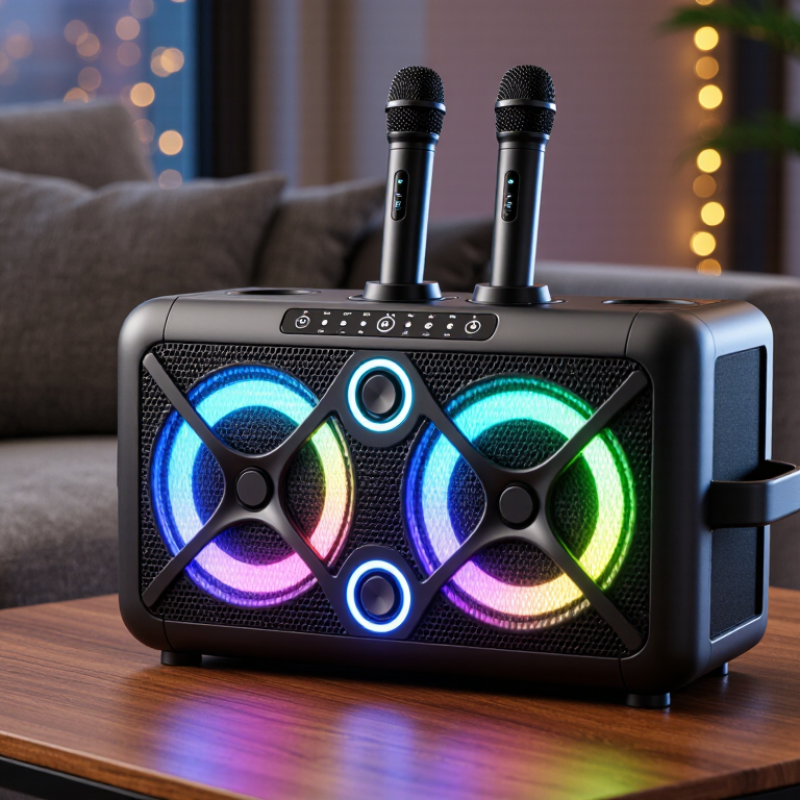
A Karaoke RGB Party Speaker can turn a living room, patio, or small gathering into a sing-along space. The right choice is not just the one with the brightest lights. Sound consultant and author Julian Treasure once described the voice as “the instrument we all play.” That idea matters here: clear vocals and easy microphone control can make a bigger difference than flashy effects.

Start with the room and the people using it. A compact speaker may suit a kitchen party, while a larger group outdoors needs stronger, fuller sound. Check whether the microphones are included, how many can connect, and whether echo or vocal adjustment is available. Then consider battery life, carrying handles, Bluetooth stability, and simple controls. Small details count. A dial that is easy to reach beats a confusing menu when guests are waiting for their turn.

RGB lighting adds atmosphere, but it cannot fix muddy vocals or weak bass. Look for lighting controls, so the colors can be softened when the room feels too bright. Read specifications carefully, and compare them with independent reviews or a hands-on test when possible. No speaker does everything perfectly. A powerful model may be heavy; a portable one may sound less full in a large space. The tips ahead help you weigh those trade-offs and choose a Karaoke RGB Party Speaker that fits your music, space, and budget.
7 Tips for Choosing a Karaoke RGB Party Speaker?

Understanding the Main Features of Karaoke RGB Party Speakers

A karaoke RGB party speaker should make voices clear, not merely sound loud. Listen for how vocals hold up when music plays at moderate volume. If the singer’s words disappear under heavy bass, the speaker may be tiring to use. Check whether bass and treble controls let you adjust the sound for different rooms. Small rooms often need less bass than open spaces. Listen before deciding.

RGB lighting adds atmosphere, but it should not distract from the performance. Look for adjustable brightness or lighting modes, especially if the speaker will be used in a dim living room. Simple controls matter. Test the buttons and display, and see whether you can change tracks without interrupting a song. For karaoke, check microphone inputs, volume controls, and echo adjustment. Too much echo can blur lyrics, so a modest range is often more useful than an impressive list of effects.

Connection options affect everyday use. Bluetooth is convenient, while an auxiliary input can help when wireless pairing is unreliable. Check battery life at the volume and lighting levels you actually expect; bright lights and loud playback can shorten it. A handle and manageable weight help when carrying the speaker between rooms. Specifications can be reassuring, but they do not tell the whole story. A speaker may look powerful on paper and still feel awkward to operate. Test the microphone, controls, and sound together if possible.

Matching Speaker Size and Power to Your Space

A room’s floor area is only part of the sizing question. Ceiling height, soft furnishings, and the distance between the speaker and guests also affect how loud and clear music sounds. In an unobstructed space, sound pressure drops by about 6 dB each time listening distance doubles. So a speaker that feels powerful beside the kitchen counter may seem underwhelming across a long patio. Wattage alone can mislead; check continuous power ratings and sensitivity, too.

Tip: Match the speaker to the farthest listening spot, not just the room’s center. For a small living room, moderate output may be enough. For a long, open space, consider greater output or two well-placed speakers. Keep clear of corners if bass turns boomy. The room is rarely a neat box.

Before buying, estimate the distance from speaker to guests and allow headroom for lively music. Then test at normal party volume, ideally with people in the space. WHO and ITU’s Global Standard for Safe Listening Devices and Systems recommends an adult listening allowance of 80 dBA for 40 hours weekly. That guidance concerns personal listening, not party-speaker sizing, but it is a useful safety reference. A phone app can offer a rough check, though it is not a calibrated meter. If voices become hard to hear, lower the level; more watts cannot fix poor placement.

Comparing Sound Quality, Microphones, and Karaoke Controls

7 Tips for Choosing a Karaoke RGB Party Speaker?

Comparing Sound Quality, Microphones, and Karaoke Controls

A karaoke speaker should keep vocals clear when music gets loud. Listen for muddy bass or sharp treble, especially at higher volume. If possible, test it in a room similar to yours. A lively shop floor can disguise weak vocals. RGB lights add atmosphere, but they do not improve sound. That matters.

Tip 1: Check whether the microphones sound natural and resist feedback. Try speaking, then singing at a normal distance from the speaker.

Tip 2: Look for separate microphone volume and echo controls. Small adjustments can help different voices feel comfortable.

Tip 3: Test the karaoke controls before buying. Buttons should be easy to find, and track changes should not interrupt the song. Simple controls often work best.

Compare wireless and wired microphone options, battery life, and how easily the speaker connects to your music source. If two microphones are included, check whether their levels can be adjusted independently. This is useful when one singer is much louder than another. Also consider where the controls sit; reaching around a crowded table gets annoying. Specs can help narrow choices, but they cannot tell you how a speaker will sound in your living room. I would not judge one from a short demo alone. A little caution pays off.

Choosing RGB Lighting and Connectivity Options

RGB lighting should support the party, not compete with it. Look for adjustable brightness and several color modes, so the speaker works in a bright living room or a dim backyard. A slow pulse can suit background music; rapid flashing may distract singers. Check whether the lights can run independently of the sound. They can be fun. They can also become tiring.

Tips: Test the controls before buying. If lighting settings sit inside an app, check that they remain easy to reach during a song. For connectivity, Bluetooth is convenient for quick playback, but wireless audio can have noticeable delay. A wired input may help keep vocals and music better aligned. Check for microphone inputs and a simple way to adjust vocal volume, too.

Think about the room and the people using the speaker. A stable Bluetooth connection may be enough for a small gathering, while an auxiliary input offers a useful backup. If several guests will connect, confirm how pairing works and whether one device must disconnect first. USB playback can be handy when Wi-Fi is unreliable, though managing files is less effortless than streaming. I once underestimated how distracting bright lights could feel after an hour. Choose controls you can understand at a glance, and leave room to change your mind.

7 Tips for Choosing a Karaoke RGB Party Speaker

RGB Lighting: Standard Color Channel Values

Each bar shows an 8-bit RGB channel value, from 0 to 255; these are standard digital color values, not measurements of a speaker’s light output. When comparing speakers, check which colors and lighting effects are supported, then confirm the connections you need—such as Bluetooth, an AUX input, USB playback, microphone inputs, or speaker pairing. Availability varies by model.

Checking Portability, Battery Life, and Durability

A karaoke RGB party speaker can seem portable in a product photo, but check its actual weight and handle shape. A narrow handle may dig into your fingers on a walk from the car to the yard. Look for a stable base, too; speakers can wobble on a folding table when people tap along. Small details matter. If you plan to carry it often, test whether you can lift it comfortably with one hand.

Battery life needs context. Runtime figures may assume moderate volume and limited lighting, while bright RGB effects and loud music can drain power faster. Check whether the speaker can play while charging, and note how long a full recharge takes. For an outdoor gathering, leave a sensible buffer rather than trusting the maximum estimate. That is useful. A low-battery warning is also easier to manage than a sudden shutdown.

Durability is more than a rugged-looking shell. Inspect the grille, buttons, microphone sockets, and charging-port cover for parts that could loosen or collect dust. If the maker lists a water-resistance rating, read what it covers; do not assume it can handle spills or rain. I would not choose the heaviest model just because it feels tougher. That trade-off is easy to misjudge, especially when the speaker will move between rooms and outdoor spaces.

FAQS

How can I tell if a karaoke speaker has clear sound?

Listen for clear vocals at higher volume. Muddy bass or sharp treble can make singing tiring. Test it in a room like yours, if possible.

What should I check when testing microphones?

Speak and sing from a normal distance. Listen for natural voices and feedback. Try adjusting each microphone separately, especially when singers have different volumes.

Which karaoke controls are most useful?

Separate microphone volume and echo controls make small adjustments easier. Buttons should be easy to find. Complicated controls can interrupt a song.

Do RGB lights improve a party speaker’s sound?

No. Lights add atmosphere, not better audio. Adjustable brightness and slower color effects may feel more comfortable during a long gathering.

Should I choose Bluetooth or a wired connection?

Bluetooth is convenient for quick playback, but audio delay can happen. A wired input may keep vocals and music better aligned. A backup helps.

What should I know about battery life?

Bright lights and loud music may use power faster than advertised runtime suggests. Check charging time and whether playback works while charging. Leave some battery buffer.

How can I judge whether a speaker is portable?

Check its actual weight and handle shape. A narrow handle can dig into your fingers. Try lifting it before deciding. Photos can mislead.

What details matter for durability?

Inspect the grille, buttons, sockets, and charging-port cover. Check what any water-resistance rating actually covers. I might still misjudge this; a rugged shell alone proves little.

Conclusion

Choosing the right Karaoke RGB Party Speaker starts with understanding the features that matter most for your gatherings. Consider the size of your space and select speaker power that can fill it comfortably without overwhelming the room. Compare sound clarity, microphone performance, and karaoke controls, including how easily you can adjust vocals and music while singing.

RGB lighting can add atmosphere, while connectivity options determine how simply you can play music from your devices. Before deciding, also think about portability, battery life, and durability. A compact, easy-to-carry speaker may suit smaller gatherings, while longer battery life can be useful when power outlets are not nearby. By balancing sound, lighting, convenience, and build quality, you can find a speaker that fits both your space and the way you plan to use it.

Evelyn

Evelyn

Evelyn is a dedicated marketing professional with a deep understanding of the company’s products, customers, and industry landscape. Through thoughtful research and practical experience, she transforms complex product information into clear, useful, and engaging content that helps readers make......